I’m very lucky to be a member of staff at a school where trying new technologies is encouraged. Recently, Google Classroom launched the Practice Sets in Beta and I have been excited to trial it with my shared Year 7 science class.
Google announced the Practice Sets saying “Educators can transform new and existing content into engaging and interactive assignments. With autograding built in, teachers can receive performance insights and snapshots into student progress.”
This sounds great to me so I was very keen to try it out. Starting with the new unit of work for Year 7 on States of Matter, I created a practice set from scratch starting with some simple recall questions from our Key Stage 3 Question Bank. I used a combination of multiple-choice answer questions and short answer questions for the first 10 questions. For example; Select the term used to describe a change of state directly from solid to gas or Which state of matter cannot be compressed? These knowledge recall questions are ones that all students are expected to be able to recall during retrieval practice. A bonus is these short answer questions can be automatically marked when students complete the Practice Set.
Setting up your Practice Sets from scratch is very similar to setting a Google Form quiz, however, it has the advantage that you can select the topic that each question pertains to and it uses some clever AI to suggest sources of information for students to refer to if they answer incorrectly. In this way, the Practice Sets are less about summative assessment and more a formative assessment. The students are learning as they are quizzed.
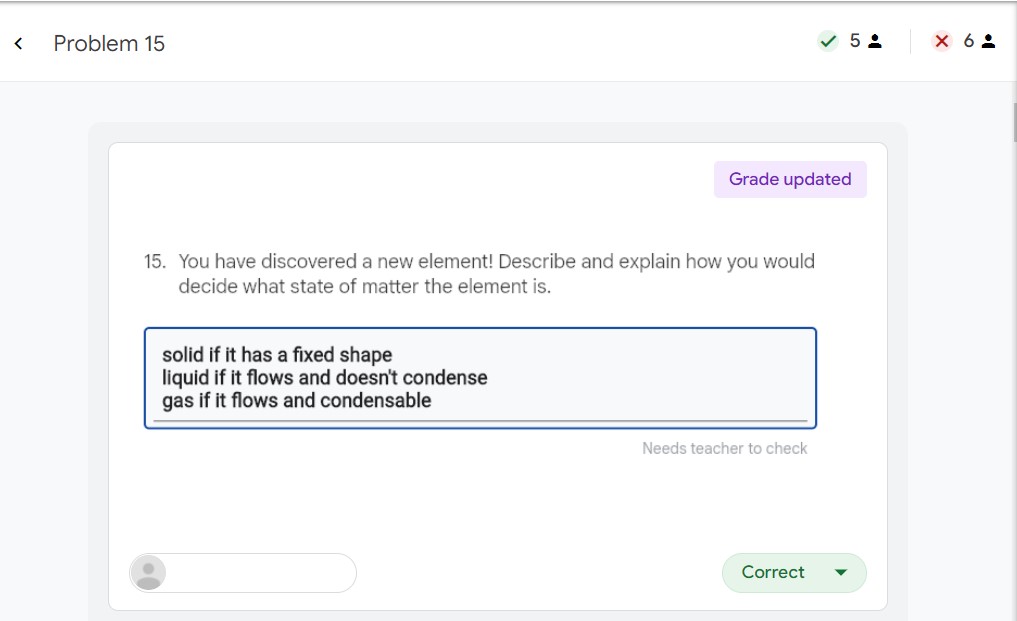
As well as the short answer questions, there is also the option to set extended response questions which need to be teacher assessed. I added five to the first practice set making it 15 questions in total. On reflection, I think this was too many and when making future sets I decided I would limit this to just one or two. This is also a little difficult to mark as, currently, the marking is binary. All answers are either “correct” or “incorrect” which doesn’t work as well for typical Key Stage 3 extended assessment questions which will often be worth multiple marks.
The whole process was relatively simple to do and, although my approach required refinement, I was able to produce three Practice Sets on upcoming topics in an hour or so.
Possibly, the most useful aspect of the Practice Sets is the “Insights” when students have finished. It allows you to see and compare the whole class very easily and identify topics to either review again with some students or topics that might need a reteach to the whole class. It also allowed me to quickly see some good answers and which students persevered through getting questions wrong.
The Practice Sets are really in their infancy and there were a few teething problems. Students on tablets or ipads cannot access the Practice Sets through the Google Classroom App. They have to sign into Google Classroom through a web browser in order to see the Practice Set assignment. Annoyingly for me, the marks when students had finished weren’t imported into the Google Classroom ‘Grades’ page. I am not sure if this was an error on my part or just a feature that hasn’t been worked in yet but certainly something I would like to see. I intend to continue trying the feature out for the remainder of the Summer term and will be asking the students for their feedback. It is a useful tool for formative assessment and the ability to link to support for students is a great feature but will I ditch other online quizzing platforms for Practice Sets? At the moment the Jury is still out.
 msdsscience